


New article
Recently updated
Resolving metadata not being captured notifications

Who is this article for?
Users who want to understand the Metadata notbeing captured notification.
some additional access might be required.
Mail Manager Enterprise allows you to capture metadata or additional information when saving emails or files, but you may encounter error messages if the metadata columns have not been configured in SharePoint.
Understanding the error messages
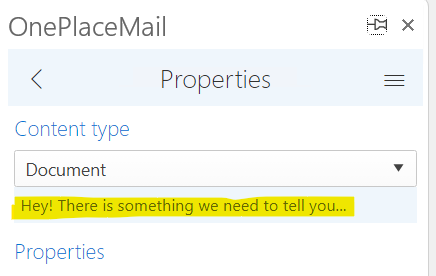
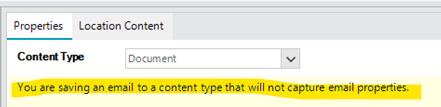
If metadata columns have not been set up in your SharePoint, you may see one of the following error messages when saving an email:
- Mail Manager Enterprise Web App: "Hey! There is something we need to tell you"
- Mail Manager Enterprise Desktop: "You are saving an email to a content type that will not capture email properties"
Changing the SharePoint content type
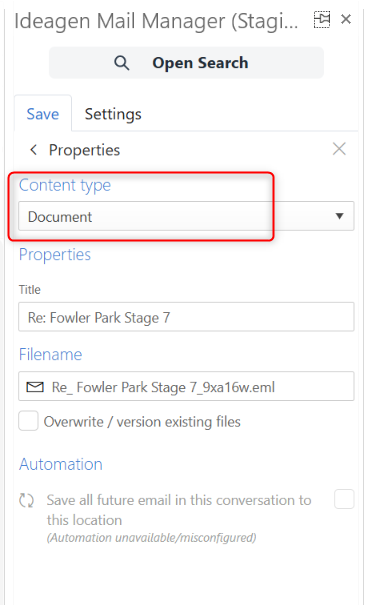
You may be saving the email with an incorrect SharePoint content type. The SharePoint content type holds all of the correct SharePoint columns and data.
To change the content type when saving:
- Select a different content type from the dropdown menu when saving your email.
- Try switching to OnePlaceMail Email if available (this is the default Mail Manager Enterprise content type, though this may vary depending on your setup).
Requesting admin configuration
If you are new to Mail Manager Enterprise and suspect that no one has set up email columns for metadata capture in your SharePoint yet, this is most likely the issue.
To resolve this:
- Contact your Mail Manager Enterprise administrator.
- Ask them to follow the steps in the article How to add email columns to your SharePoint for metadata capture to set up the correct email columns using the admin tool.