


New article
Recently updated
Supporting Adobe and Ideagen Mail Manager Enterprise Docs

Who is this article for?
Users looking for support for Adobe.
No elevated permissions are required.
Explore the support available for the 32-bit version of Adobe and Ideagen Mail Manager Enterprise Docs with this informative guide. Gain insights and assistance tailored specifically to enhance your experience with these software solutions.
Important: Since the 9.1 Mail Manager Docs release, this feature is limited. Instead, refer to the Inserting as a PDF capability article. Save the PDF file and insert it as needed, avoiding the need to open the PDF.
Support for Adobe and Ideagen Mail Manager Enterprise Docs
Ideagen Mail Manager Enterprise Docs no longer supports Adobe integration from version 9.x onwards
This is because Adobe requires an old piece of software to be installed (virtual studio runtime 2010), this is a security risk, so we no longer have a native adobe integration in Ideagen Mail Manager Enterprise.
You can still open PDFs with any windows PDF application, including Adobe, however we have not built this into our software.
Previous OnePlaceDocs Versions Adobe Support
OnePlace version 8.xx and below does support the 32-bit version of Adobe, not the 64 bit version.
Recently, Adobe updated their downloads area to automatically download the 64-bit version.
If you are running Ideagen Mail Manager Enterprise version 8.xx, to workaround this, please install Adobe 32-bit version.
- Browse to: https://get.adobe.com/reader
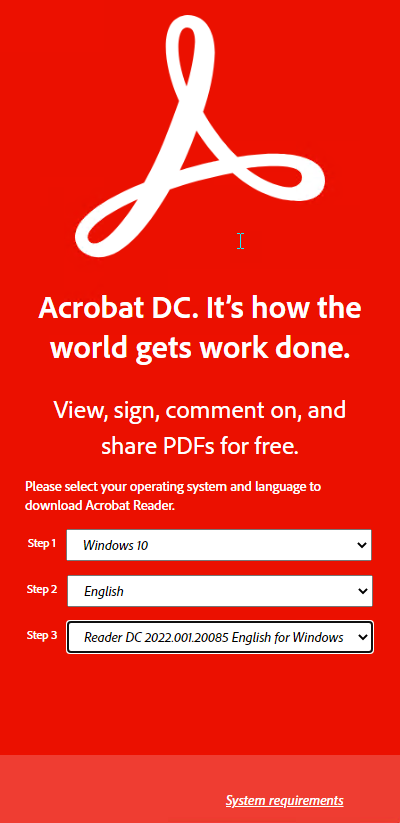
- Select Do you have a different language or operating system?
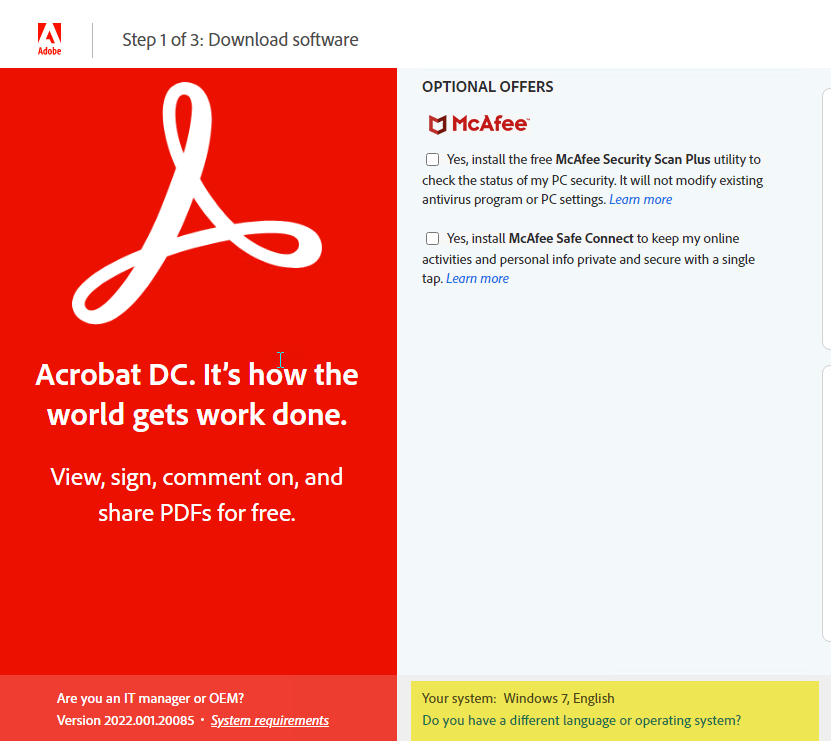
- Select Windows 10, English and Reader DC, 2022.001.20085 English for Windows (or latest listed version)
- Uncheck the McAffee Options if required
- Select Download Acrobat Reader
Note: When installing Adobe - please ensure that Adobe is installed prior to OnePlaceDocs.